
Recipe Maker Manual: Save, Organize and Share Your Recipes
Want to get the most out of Recipe Maker? In this step-by-step manual, we explain how to save recipes, add your own recipes, import recipes from websites and organize everything into personal cookbooks. You'll also learn how to use helpful features such as adjusting ingredients, cooking mode, timers, sharing recipes and much more.
Want access to all features and unlimited recipe storage? Discover what's included with the Recipe Maker Pro subscription
Overview
Recipe Maker is divided into ten main sections, which you can access from the main menu in the app. This Recipe Maker manual explains what each section does and how to use it.
| Section | Description |
|---|---|
| Recipes |
This is your main screen and contains your recipe collection. From here, you can open individual recipes, search your recipes and browse them by category. |
| Add Recipes |
Search for recipes with Google, add your own recipe or import recipes from popular recipe websites. |
| Inspiration | Discover, search and sort popular public recipes for new cooking inspiration. |
| Cookbooks | Browse public cookbooks and easily add recipes to your own collection. |
| My Cookbooks | Create your own cookbooks and share them with friends or family. |
| Cooking Techniques | Find explanations of common cooking techniques you may come across in recipes. |
| Seasonal Calendar | Discover which ingredients are in season throughout the year. |
| Help & Tips | Watch helpful videos about Recipe Maker or contact us if you have a question. |
| Share App | Share Recipe Maker with your friends and family. |
| Settings | Manage your settings, customize the appearance of the app and update your password or email address. |
Find and organize recipes
Search your recipes
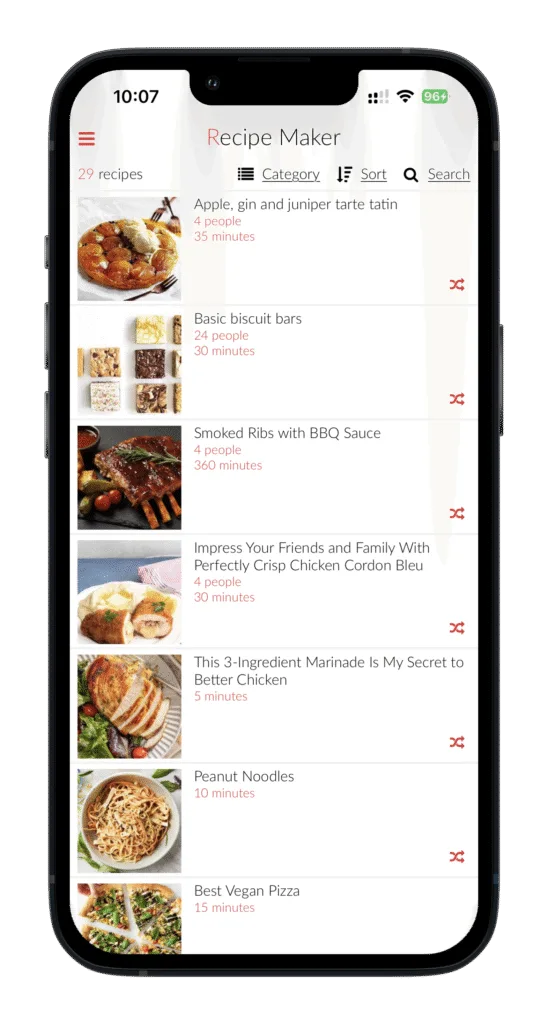
All your recipes are displayed in the recipe overview. Tap Search in the top-right corner to quickly find a recipe. You can search by recipe name, tags or specific ingredients, such as chicken.
Browse by category
The default category is All Recipes, where all your recipes are displayed in alphabetical order. Want to view a different category? Tap Category at the top and select the category you want to view.
Sort your recipes
Tap Sort at the top to organize your recipes in different ways, including:
- Recipe name (A-Z)
- Preparation time (high-low)
- Date added (newest-oldest)
- Most cooked
- Most viewed
Search within categories
When you select a category, you can search for recipes within that category. Can't find the recipe you're looking for? Clear the selected category to search through all your recipes again.
Create a category
Want to organize your recipes your own way? Open a recipe, tap Edit and go to the Category field.
Instead of selecting an existing category, you can enter a new category name. This makes it easy to organize your recipes into your own categories.
Delete a category
Want to delete a category you've created? Follow these steps:
- Select the category you want to delete from your recipe list.
- Open the recipes assigned to this category and change their category.
- Once there are no recipes left in the category, it will automatically disappear.
Link related recipes
(Pro version)
Want to link recipes together? Open a recipe, tap Edit and scroll down to Related recipes. If you're already on the edit screen, swipe right to open this option.
Here's how it works:
- Tap Add.
- Select the recipes you want to link to the recipe.
- Tap Save at the bottom.
The linked recipes will now appear at the bottom of the recipe. Tap a linked recipe to quickly switch between recipes. Use the arrow in the top-left corner to easily return to the original recipe.
👨🍳 Tip: especially useful while cooking when you want to quickly switch between a main course, side dish or sauce.
Add photos to a recipe
Want to add one or more photos to a recipe? Save the recipe first and then open it. Tap Options and then Edit recipe.
Tap the white photo area in the top-left corner and select Add photo. You can then choose between Take photo and Choose from album.
You can add multiple photos to a single recipe. Tap the star next to a photo to set it as the main image shown for the recipe in your recipe list.
Add and edit your own recipe
Add a recipe
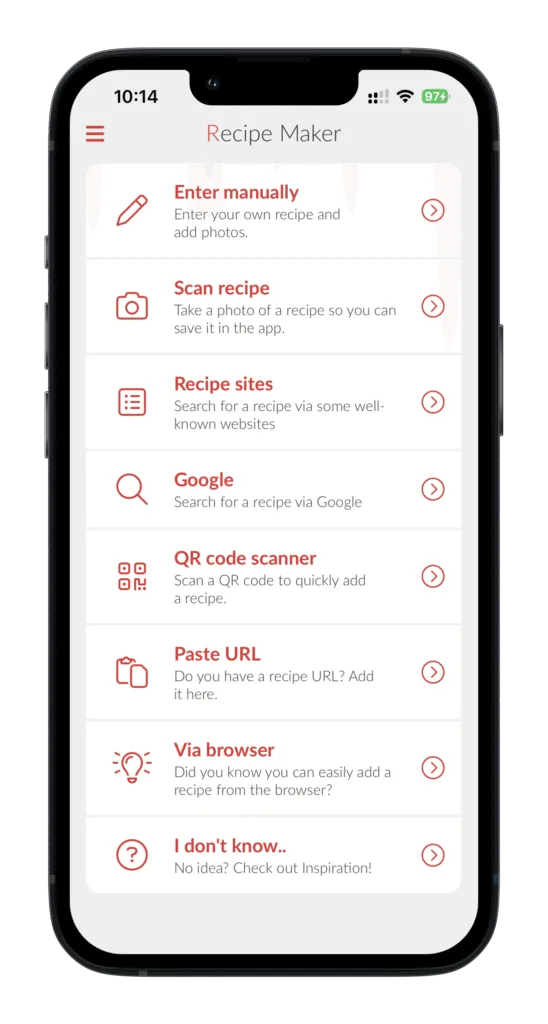
Want to add your own recipe to Recipe Maker? Open the menu, select Add recipes and then choose Enter a recipe manually.
A blank recipe screen will appear where you can enter information such as the recipe name, type of dish (category), source URL, tags, notes, number of servings, number of pieces, preparation time, oven time, oven temperature and source.
Swipe left to add the Ingredients, Preparation and Nutrition details. Then tap Save.
Good to know: only the recipe name is required. All other information is optional.
Delete a recipe
Want to delete a recipe? You can do this in several ways:
- From the recipe overview: swipe from right to left on the recipe. A delete icon will appear. Tap it to delete the recipe.
- From the recipe: open the recipe, tap Options, select Edit recipe and then tap Delete at the bottom.
Recipe fields
These are the fields you can fill in when creating or editing a recipe in Recipe Maker:
| Field | Description |
|---|---|
| Name | Enter the name of the recipe. |
| Categories | Enter a category or select an existing category from the list. |
| Source | Enter where or who the recipe came from, for example a website, cookbook, friend or family member. |
| Tags | Add a new tag or select an existing tag from the list. |
| Note | Add notes or other important information about the recipe. |
| Rating | Rate your recipe using stars. |
| Number of servings | Enter the number of servings. This can be used to automatically adjust the ingredient quantities. |
| Number of pieces | Enter the number of pieces. This can be used to automatically adjust the ingredient quantities. |
| Preparation time | Enter the required preparation time. |
| Cooking time | Enter the required cooking time. |
| Oven time | Enter how long the dish needs to be in the oven. |
| Oven temperature | Enter the required oven temperature. |
| Ingredients |
Add all the ingredients needed for the recipe. Tip: create subheadings by adding -- at the beginning of a line. |
| Preparation |
Describe step by step how to prepare the recipe. Tip: create subheadings by adding -- at the beginning of a line. |
| Nutritional information | Enter the nutritional information per person or serving. |
Don't have Recipe Maker yet? With the app, you can save and organize all your favorite recipes in one place. Add your own recipes, save recipes from websites and organize them into your own cookbooks.
Download Recipe Maker and try the app for free 🚀
View and use a recipe
Adjust ingredients by number of servings or pieces
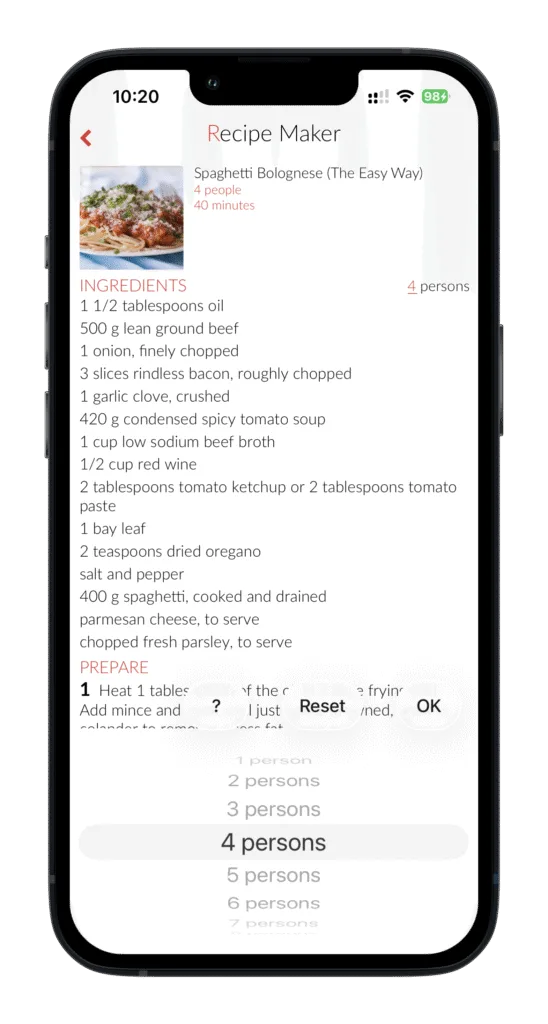
For recipes where the number of servings or pieces has been entered, Recipe Maker can automatically adjust the ingredient quantities. Adjusted quantities are shown in red. Only numbers at the beginning of an ingredient are automatically adjusted.
What do you need to do first?
- Open the recipe you want to adjust and tap Edit.
- Tap Name.
- Enter the desired number of servings or pieces.
- Save the recipe.
The number of servings or pieces will now appear next to the ingredients. Tap it to select a different amount. Recipe Maker will automatically recalculate the ingredient quantities for you.
Use Cooking Mode
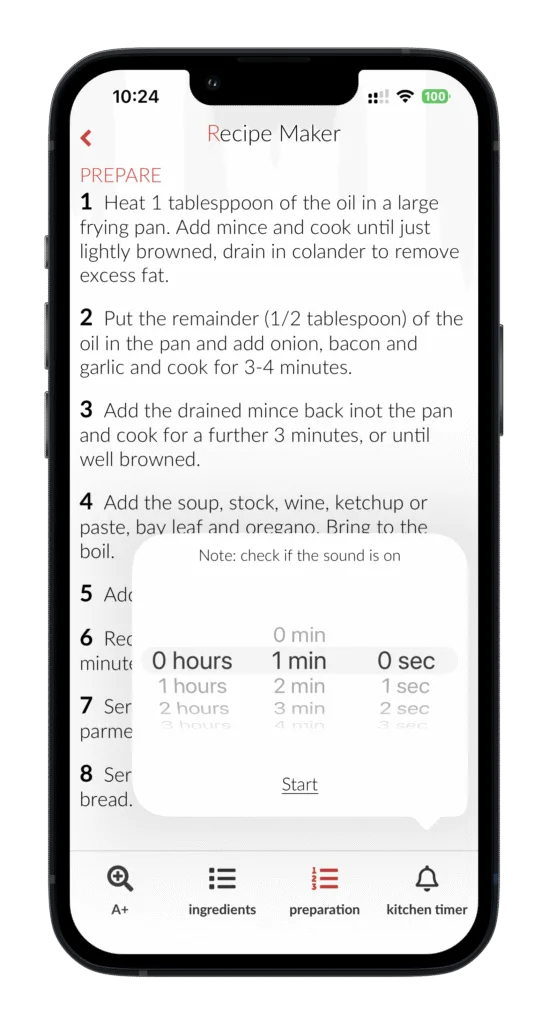
Want to cook a recipe without your screen constantly turning off? Open the recipe and tap Cooking Mode at the bottom.
In Cooking Mode, you can:
- Tap the magnifying glass in the bottom-left corner to enlarge the text.
- Tap Ingredients to view the ingredient list.
- Tap Preparation to view the preparation steps.
The main advantage of Cooking Mode is that your device won't automatically go to sleep while you're cooking. This keeps your recipe visible while you prepare your dish.
Use timers while cooking
In Cooking Mode, you'll also find the cooking timer. You can use it to easily set a timer while preparing your recipe.
Note: make sure the sound on your device is turned on so you can hear the timer when it goes off.
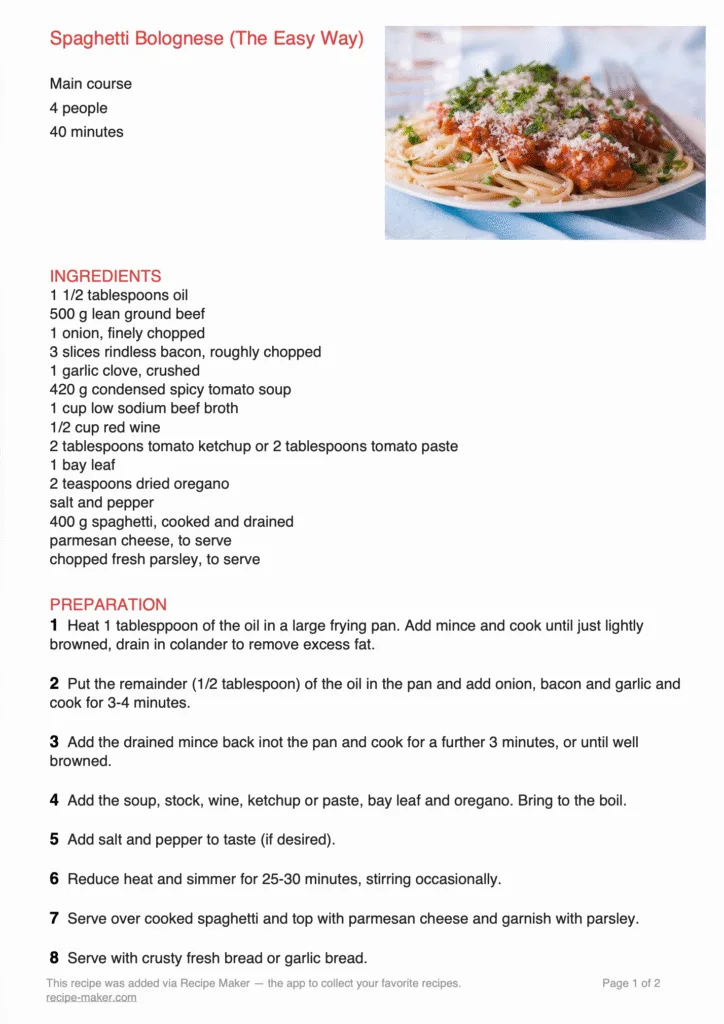
Print or share a recipe as a PDF
Want to print a recipe or share it as a PDF? Open the recipe, tap Options and then select Share/print PDF.
You can choose whether you want to create the PDF with or without a photo.
You can then print, save or share the PDF using the available sharing options on your device, for example via email or WhatsApp.
See an example of a PDF created with Recipe Maker below.
Add a recipe to your calendar
Want to plan a recipe in advance? Here's how to add a recipe to your calendar:
- Open the recipe you want to plan.
- Tap Options and select Add to calendar.
- Choose when you want to prepare the recipe and add it to your calendar.
The recipe title, a link to the recipe and the ingredients will be added to your calendar. You can use the link to open the recipe directly in Recipe Maker. This keeps everything you need in one place.
Add a recipe to a cookbook
Want to keep your recipes organized in your own cookbooks? Here's how to add a recipe to a cookbook:
- Open the recipe you want to add to a cookbook.
- Tap Options and select Add to cookbook.
- Select the cookbook where you want to save the recipe.
Under My cookbooks, you can also easily add existing recipes to a cookbook.
Collect ingredients
Want to combine the ingredients from multiple recipes into one list? You can easily do this directly from a recipe.
- Open the recipe you want to collect the ingredients from.
- Tap Options and select Collect ingredients.
- Want to add ingredients from more recipes? Tap OK and repeat these steps for the other recipes.
- Once you've collected all the ingredients, tap Send now.
- You can then share the collected ingredients or, for example, add them to a notes app.
This makes it easy to combine the ingredients from multiple recipes into one clear list.
Save and scan recipes from websites
With Recipe Maker, you can save recipes from websites and add them to your own recipe collection in several ways.
You can add recipes:
- using the bookmark feature in Recipe Maker;
- using the share function in your phone or tablet's browser;
- using Recipe Maker's built-in web browser;
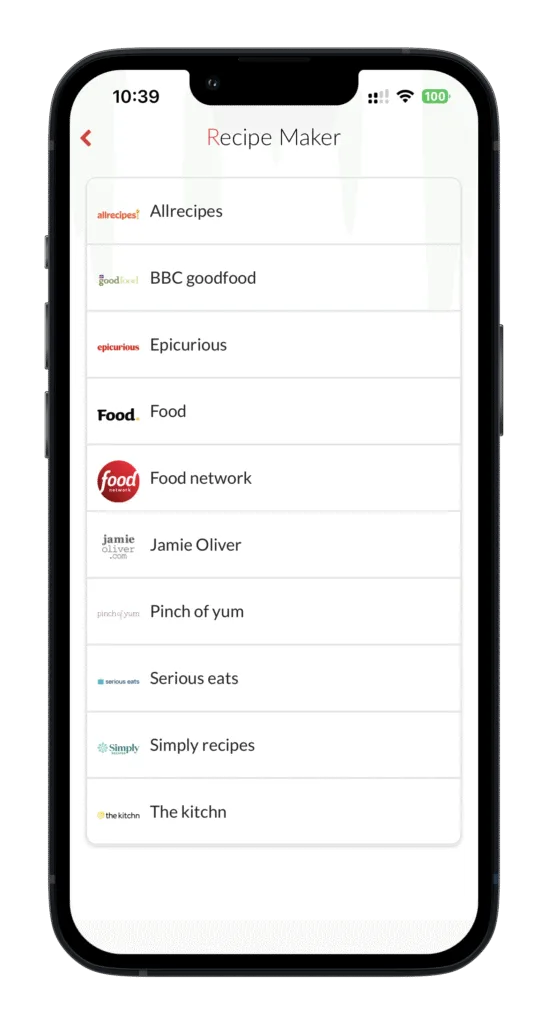
- from the list of recipe websites in the app.
This makes it easy to save recipes you find online in Recipe Maker and quickly find them again later.
Scan a recipe
(Pro version)
Want to add a recipe from a cookbook, magazine or printed recipe without typing everything manually? Use Recipe Maker's scanning feature.
Here's how to scan a recipe:
- Open the menu and select Add recipe.
- Then select Scan recipe.
- Take a clear photo of the recipe, for example from a cookbook, magazine or printed recipe.
📸 After taking the photo, Recipe Maker automatically recognizes the text and fills in the recipe for you. Check the recipe afterwards and edit or add any information where needed.
This allows you to quickly digitize a recipe and save it to your own recipe collection without having to type everything manually.
Add a recipe using a bookmark
Want to quickly save a recipe from a website to Recipe Maker while using your computer? You can set up a bookmarklet in your browser.
Here's how to set up the bookmark:
- Open your browser, for example Google Chrome.
- Show the bookmarks bar if it isn't already visible. In Chrome, click the three dots in the top-right corner, go to Bookmarks and select the option to show the bookmarks bar.
-
Create a new bookmark.
- Right-click the bookmarks bar and select Add page.
- Give the bookmark a recognizable name, for example Recipe Maker.
- Enter the code below in the URL field:
javascript:window.open('https://www.receptenmaker.com/parse/index.php?url='+location.href);void(0);
Then click Save.
Here's how to use the bookmark:
- Open a recipe on a website that you want to save.
- Click the Recipe Maker bookmark in your bookmarks bar.
- The recipe will then be added to your Recipe Maker account.
This makes it easy to collect recipes you find online and save them directly to Recipe Maker.
Add a recipe via your browser on your phone or tablet
Want to save a recipe from a website directly to the Recipe Maker app? You can easily do this using the share function in your browser on your phone or tablet.
Here's how to add a recipe from your browser:
- Open the recipe you want to save on a website.
-
Open the share menu in your browser.
- iPhone or iPad: tap the share icon.
- Android: tap the share icon. You'll usually find it directly in the browser or in the menu.
-
Select Recipe Maker from the available sharing options.
- Can't see Recipe Maker right away? Check the other apps or sharing options.
- You can also add Recipe Maker to your favorite sharing options, so it's easier to find next time.
-
Add the recipe to Recipe Maker.
- Tap the Recipe Maker icon.
- The recipe will then be added to Recipe Maker.
Once you've added Recipe Maker to your sharing options, you can quickly save recipes you find online directly from your browser to the app.
Add a recipe using the built-in browser
Want to search for a recipe online without leaving Recipe Maker? Use the app's built-in browser. You can search for a recipe and add it directly to your recipe collection.
- Open the Recipe Maker app on your phone or tablet.
-
Go to Add recipe.
Open the menu and select Add recipe. -
Use the built-in browser.
On the Add recipe screen, you'll find a search bar. Enter the URL of a website you want to search or use the search function to find a website or recipe. -
Find the recipe you want.
Browse the website and open the recipe you want to save. -
Add the recipe to Recipe Maker.
At the bottom of the screen, you'll see the option Add this recipe to my recipes. Tap it to add the recipe to your recipe collection.
This way, you can search for recipes on websites directly from Recipe Maker and save them to the app straight away.
Add a recipe via recipe websites
Recipe Maker includes a selection of popular recipe websites that you can visit directly from the app. This makes it easy to discover recipes online and add them to your own recipe collection.
In the app, go to Add Recipe and choose one of the available recipe websites.
You can browse popular recipe websites such as BBC Good Food, Jamie Oliver, Allrecipes, Food Network and Food.com.
When you add a recipe from an external website, Recipe Maker keeps the original source linked to the recipe.
Recipe inspiration
Looking for inspiration for what to cook? In the Inspiration section of Recipe Maker, you can easily discover new recipes and ideas for your next meal.
Here's how to open Recipe Inspiration:
- Open the Recipe Maker app on your device.
- Open the menu.
- Select Inspiration.
In this section, you can find inspiration for:
- Allerhande Recipes: discover recipes from Albert Heijn's Allerhande.
- Quick Recipes: perfect for when you don't have much time to cook.
- Easy Recipes: simple dishes that are easy to prepare.
- Popular Recipes: discover recipes that are popular with other users.
- Random Main Courses: get inspired by a random selection of main dishes.
Recipe Maker not only helps you save and organize your own recipes, but also makes it easy to find inspiration for what to cook today.
Search public recipes
Use the search bar in the Inspiration section to search through public recipes. You can search by recipe name, ingredient or category.
Found a recipe you like? Open it and use it as inspiration for your next meal.
Useful recipe searches
In the Inspiration section, we've selected a few useful searches to help you quickly find recipes that match what you're looking for:
- Quick Recipes: recipes with a maximum preparation time of 15 minutes.
- Easy Recipes: recipes with no more than 6 ingredients.
- Popular Recipes: the most added recipes of the week.
- Random Main Courses: discover 5 randomly selected main courses.
This makes it easy to find inspiration, whether you're short on time, want to cook with just a few ingredients or simply feel like trying something new.
Browse Recipes
In the Inspiration section of the Recipe Maker app, you can easily browse through recipes. When you find a delicious dish, you can add it to your personal recipe collection with just one click. This makes collecting and managing your favorite recipes even easier.
Create and share cookbooks
In Recipe Maker, you'll find general cookbooks such as World Cuisine, Baking Recipes and Winter Recipes. You can also create your own cookbooks to keep your favorite recipes organized.
Create and share your own cookbooks
- Organize your recipes: collect your favorite recipes in personal cookbooks, for example for baking, barbecue, pasta or your favorite family recipes.
- Share with family and friends: easily share your cookbooks with others so they can view your recipe collections.
- Receive cookbooks from others: receive cookbooks from other Recipe Maker users and add them to your own collection.
This makes it easy to organize all your recipes into digital cookbooks and share your recipe collections with family and friends.
Recipe collections
In Recipe Maker's recipe collections, you'll find inspiration for different occasions and seasons. The collections are regularly updated with new recipes.
Explore collections featuring recipes for game, Christmas dishes, soups, winter comfort food and much more.
Open a collection to browse the recipes. Found a recipe you'd like to save? With just one click, you can add it to your own recipe collection in Recipe Maker.
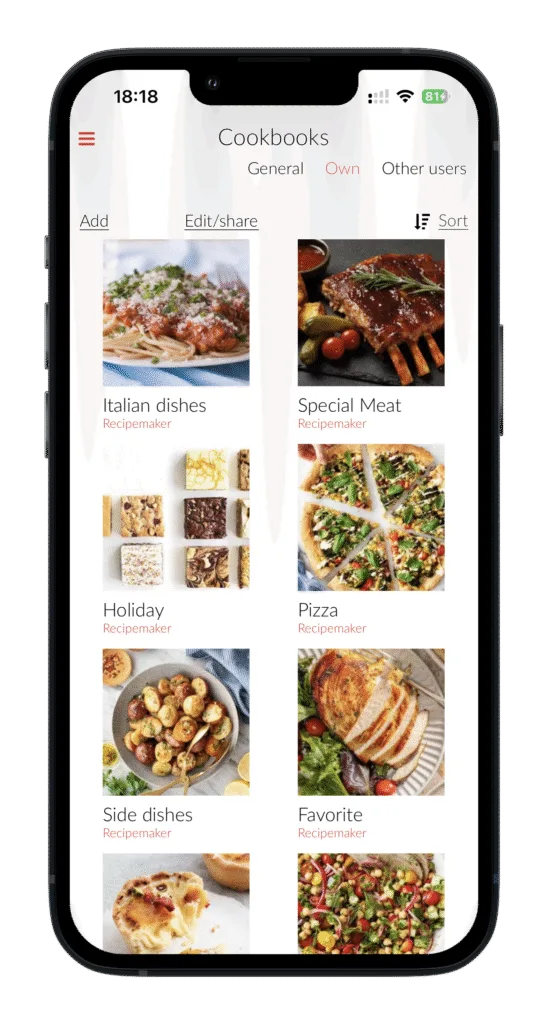
Personal cookbooks
With personal cookbooks, you can collect and organize your favorite recipes in a way that works for you. For example, create a cookbook for your favorite recipes, baking, barbecue dishes or family recipes.
Create a personal cookbook
- Go to Personal cookbooks in the menu.
- Tap Add.
- Give your cookbook a name and save it.
- Select the recipes you want to add to the cookbook.
- Use the categories, sorting options or search function at the top to find recipes more quickly.
- A star will appear next to the recipes you've selected. Tap the star next to the recipe whose photo you want to use as the cover image for your cookbook.
- Selected all the recipes you want? Save the cookbook at the bottom of the screen.
View a personal cookbook
- Go to Personal cookbooks in the menu.
- Tap the cookbook you want to view.
- The recipes you've added to this cookbook will then appear on your screen.
Edit or delete a personal cookbook
- Go to Personal cookbooks in the menu.
- Press and hold the cookbook you want to edit.
- Tap Edit.
- You can now add more recipes or remove existing recipes from the cookbook.
- At the bottom of the screen, you can change the cookbook's name or delete the cookbook completely.
This way, you can create different digital cookbooks and keep your recipes neatly organized by topic, occasion or personal preference.
Share a personal cookbook
Want to share your recipe collection with friends, colleagues or family? You can easily share a personal cookbook using a link.
- Go to Personal cookbooks in the menu.
- Press and hold the cookbook you want to share.
- Tap Share or Manage sharing.
- Share the link to your cookbook with friends, colleagues or family.
Anyone with the shared link can view your cookbook and the recipes it contains.
Share a personal cookbook
Want to share your recipe collection with friends, colleagues or family? You can easily share a personal cookbook using a link.
- Go to Personal cookbooks in the menu.
- Press and hold the cookbook you want to share.
- Tap Share or Manage sharing.
- Share the link to your cookbook with friends, colleagues or family.
Anyone with the shared link can view your cookbook and the recipes it contains.
Cooking techniques explained
In Recipe Maker, you'll find explanations of different cooking techniques. This makes it easy to look up what a cooking term means and how to use the technique while cooking.
Explore different methods such as baking, roasting, grilling, braising and other techniques you may come across in recipes.
Is there a cooking technique missing, or do you have a question about a particular technique? Feel free to let us know.
Seasonal calendar
Cooking with the seasons
In Recipe Maker's seasonal calendar, you can discover which ingredients are currently in season. Browse by month and category to see which seasonal products are available.
Explore seasonal products in different categories, such as vegetables, fruit, fish and game. This makes it easy to choose and prepare recipes using ingredients that are in season.
Recipe Maker settings
In Settings in the Recipe Maker app, you can manage your account, subscription and various preferences.
Account and personal information
In your account settings, you can:
- change your password;
- change your email address;
- log out;
- delete your account.
Recipe Maker Pro subscription
You can try Recipe Maker for free and save up to 10 recipes. Want to save more recipes and access all Pro features? You can upgrade to Recipe Maker Pro.
With a Pro subscription, you can save unlimited recipes and get access to the full Pro version of Recipe Maker.
The Pro subscription costs €11.99 per year.
Discover all features and benefits on the
Recipe Maker Pro subscription page.
Activate Pro: in the app, go to Settings → In-app purchases to start your subscription.
Layout and appearance
You can customize Recipe Maker in several ways to suit your preferences:
- Font style: choose between Normal or Slim.
- Automatic preparation steps: turn this feature on or off.
- Show nutritional information: choose whether nutritional information is displayed with your recipes.
- Photo as menu background: tap Share on a recipe photo and select Set as Recipe Maker background to use your own photo as the background.
- Home screen: choose whether Recipe Maker opens with your recipe overview or your personal cookbooks by default.
Alerts and notifications
In Recipe Maker, you can choose which notifications you'd like to receive. You can enable alerts for:
- tips, news and updates;
- new cookbooks.
Change the language
Want to use Recipe Maker in a different language? You can change the language through your device settings:
- Open Settings on your device.
- Tap Apps.
- Find and select Recipe Maker.
- Tap Language.
- Select your preferred language.
Recipe Maker will then be displayed in the language you've selected for the app.